スマートフォンカメラの操作説明
Smartphone camera operation instructions
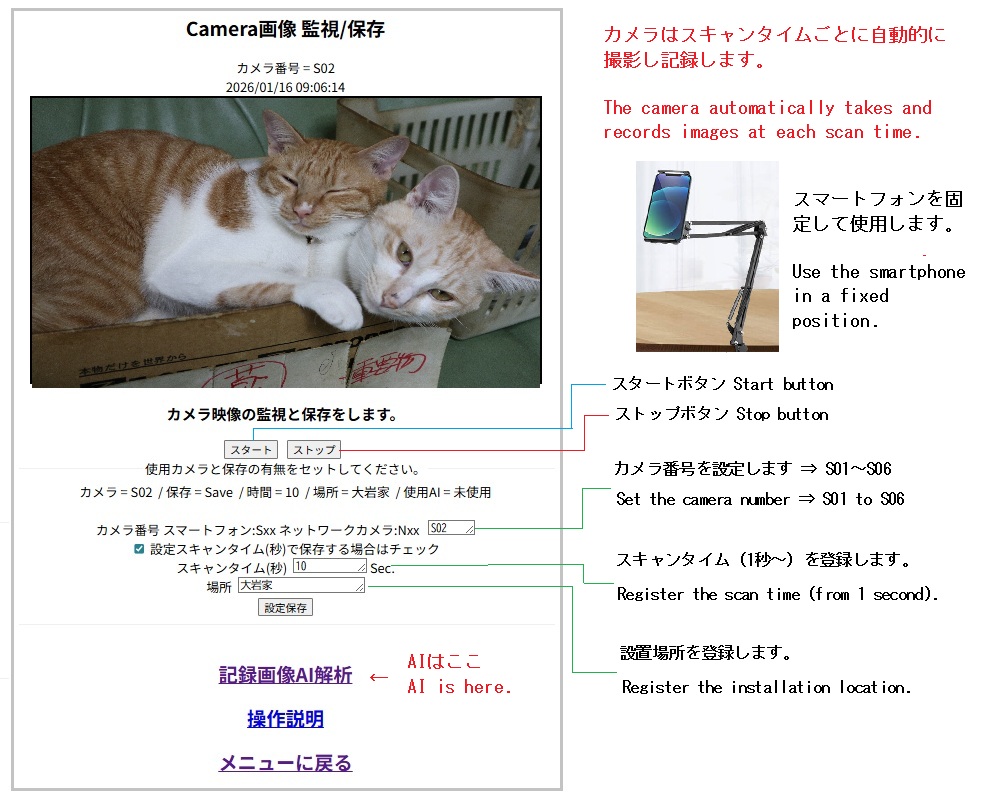
スマートフォンは同じ場所に固定して使用します。
そのためにスキャンタイムごとに自動で撮影します。
使用カメラ(S01~S06)とスキャンタイムを秒単位で設定します。
[スタート]ボタンで撮影を開始します。
[ストップ]ボタンで終了します。
画像は記録され、「記録画像AI解析」でリンクします。
場所も設定し、時間などと総合的にAI解析します。
The smartphone must be fixed in the same location for use.
To achieve this, it automatically takes a photo at each scan time.
Set the camera to be used (S01 to S06) and the scan time in seconds.
Press the [Start] button to start.
Press the [Stop] button to end.
The images are recorded and linked to the "Recorded Image AI Analysis".
Comprehensive AI analysis is performed based on location, time, etc.